- Applications
- Photography
Acapella Maker - Video Collage
| Install | 1.4 K |
| From 3 Rates | 3.3 |
| Category | Photography |
| Size | 44 MB |
| Last Update | 2026 October 13 |

| Install | 1.4 K |
| From 3 Rates | 3.3 |
| Category | Photography |
| Size | 44 MB |
| Last Update | 2026 October 13 |
Images


Introduction
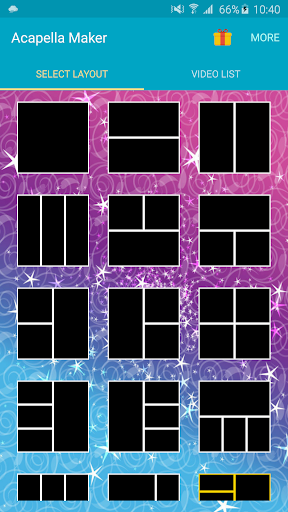
Sing every part yourself and share it as one acapella video. Acapella Maker is an acapella video maker for Android: it records each voice part with your phone's camera and puts the parts side by side in a split-screen video collage. Soprano, alto, tenor and bass, a beatbox line under a cover song, a duet with yourself, or a whole church choir sung by one person: your own virtual choir.
HOW IT WORKS
1. Pick a layout: 42 layouts for 1 to 9 voices
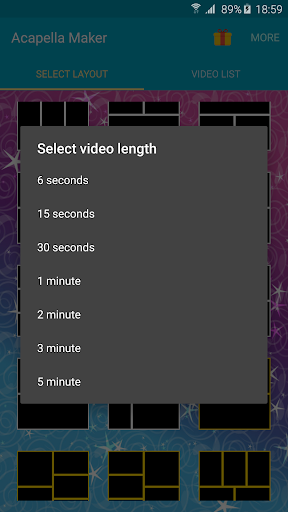
2. Pick a length, from 6 seconds up to 5 minutes
3. Add a guide track if you like: a song or backing track from your phone, or record one on the spot (the melody, a piano, a starting note), and listen to it while you sing
4. Record each part with the front or back camera, and record any part again until it sounds right
5. Make the video and share it to WhatsApp, Facebook, Instagram, TikTok or YouTube
MADE FOR SINGERS
• Choirs and church choirs: sing every voice for a gospel song, a hymn or a rehearsal
• A cappella groups and barbershop quartets
• Beatboxers and vocal percussion
• Harmony singers and cover songs
• Friends and family in one room: pass the phone around and let everyone sing a part
HEAR YOUR EARLIER PARTS, THEN MIX
• Put on headphones and hear your earlier parts while you record the next one
• Every part gets its own automatic timing, and a one-time audio calibration helps the voices line up
• In the Mix screen, set each part's volume and timing and play all the parts together before you create the video
• Loudness stays even, whether you record 2 parts or 9
• Wired, Bluetooth and USB headphones are recognized
EDIT YOUR COLLAGE
• Drag parts to swap their places in the layout
• Change the border color
• Your finished video is saved to your gallery, ready to share
FREE AND PREMIUM
Free: layouts with 1 to 4 voices and videos up to 1 minute, with a small Acapella Maker watermark and ads.
Premium is a one-time upgrade, not a subscription: all 42 layouts with up to 9 voices, videos up to 5 minutes, no watermark and no ads.
TIPS FOR A GOOD A CAPPELLA VIDEO
• Wear headphones when you sing along, so the microphone only hears your voice
• Keep the phone in the same place for every part, so the collage looks even
• Short on time? Start with 2 or 3 voices and a 30 second video
Questions or ideas? Write to acapella.maker@gmail.com. We read every message.

Related Applications










Users Also Installed









Similar Applications