- Applications
- Tools
Battery Meter Overlay

| Install | 590 |
| From 4 Rates | 2.8 |
| Category | Tools |
| Size | 3 MB |
| Last Update | 2026 September 9 |

| Install | 590 |
| From 4 Rates | 2.8 |
| Category | Tools |
| Size | 3 MB |
| Last Update | 2026 September 9 |
Images


Introduction
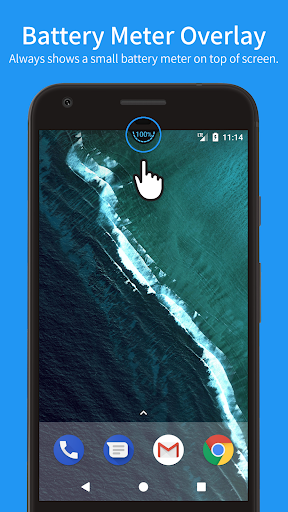
Battery Meter Overlay always shows the battery percentage at the top of the screen.
With Battery Meter Overlay, you can see if your battery is charged enough to play a game, watch a movie, or to browse the web.
* FEATURES
✓ Shows battery information in percent (%)
✓ Shows battery meter on top of other apps
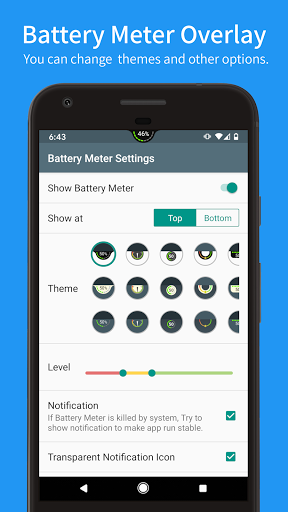
✓ Support themes for meter colors and backgrounds.
✓ Show or hide the notification.
✓ Overlap on top of the status bar.
✓ Show the meter on the lock screen with notification
✓ [NEW!] Show the meter directly on the lock screen using Accessibility Service
* PRO FEATURES (Need Pro Key (Unlocker))
✓ No ads
✓ Auto hide on fullscreen
✓ Can adjust meter position manually (respect screen orientation)
✓ Can change meter colors (levels/charging/text/background)
✓ Can adjust meter size (x0.5 ~ x2.0)
If you like this app, Please consider buying the Pro key.
[Special access permission]
- To display the battery meter on top of other apps, grant the permission of "Draw over other apps" the first time you open the app.
- To display the battery meter directly on the lock screen, select Enhanced Mode and enable the use of "Accessibility Service".
[Restrictions for Android Oreo (8.0) users]
Due to Android OS security improvement, it is not possible to show Battery Meter Overlay on top of the status bar. So Battery Meter is always shown below the status bar.


Related Applications






Users Also Installed







Similar Applications