- Install
- <100
- Category
- Tools
- Last updated
- 2026 July 13
- Size
- 11 MB
View antivirus results
| Antivirus | Status |
|---|---|
| McAfee | Clean |
| FSecure | No result |
Needs further review: this scanner has not returned a result for this version of the app. | |
| Symantec | Clean |
| ClamAv | Clean |
| Kaspersky | Clean |
| Eset | Clean |
| DrWeb | Clean |
| Comodo | Clean |
| ZonerMobileSecurity | Clean |
| GooglePlayProtect | Clean |
App screenshots



About this app
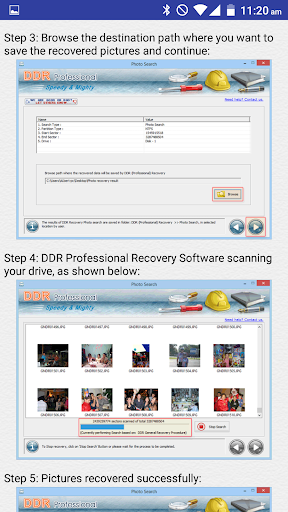
Hard Disk Data Recovery Advisor is free App to help users who are trying to recover data from crashed Computer hard drives such as Laptop Desktop External Hard disks and USB Flash Drive of Windows as well as Mac using DDR Data Recovery Software. App has following basic Data recovery categories on the basis of primary data loss cases:
* Crashed Hard Disk of Laptop
* Deleted Hard Disk Partition
* Deleted Hard Disk Data
* Formatted Hard Disk Drive
* Deleted External USB Hard disk Data
* Corrupted Hard Disk Drive Partition
* Internal or External USB Disk Drive Partitions not detected in your Computer
* Accidently deleted data pictures files folders videos from Hard Drive
* Erased Photos from Hard Disk
* Videos Recovery
* Corrupted Pen Drive External USB Hard Disk and Flash Drive Storage data recovery
* Deleted Files and Folders
* Lost Photos Videos and other Data
Besides this Recovery Steps and Solutions for flowing common Drive errors:
* Disk not formatted
* You need to format the Disk in Drive E: before you can use it
Do you want to format it?
* Data Error ( Cyclic Redundancy Check )
* Partition is displayed as unallocated in Disk Management
* Partition file system is as RAW
* Unknown Partition
DDR Recovery Software is available for Windows as well as Mac operating Systems.
What’s new
Added Support for newer devices.
Better feedback and suggestion system with GUI fixes.