- Applications
- Tools
Flash Alerts 2: Call, SMS, LED

Images

Introduction
Flash Alerts 2 makes your phone's flash (LED) blink for incoming calls, texts, and app notifications - so you never miss an alert in a silent meeting, a loud room, with earbuds in, or if you're deaf or hard of hearing. First released in 2013, Flash Alerts 2 is one of the original flash notification apps for Android.
FEATURES
- Incoming call flash - the flash blinks when your phone rings
- App notification flash - pick which apps (texts, messaging apps, and more) trigger a flash
- VoIP call notifications - flash for incoming voice/video calls from apps (Android 12 and above)
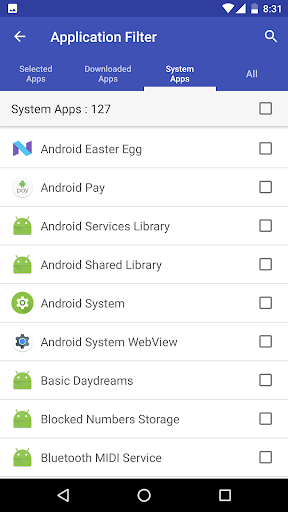
- App Notification Filter - choose exactly which installed apps trigger a flash
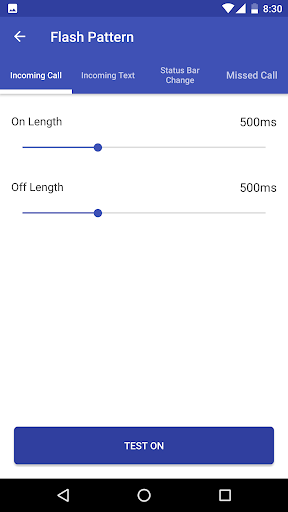
- Custom flash pattern - set the on/off length, plus a repeat count for app notifications
- Flash blink mode - Auto (recommended), Standard, or minimize status bar flicker
- Flash position - front, back, or both
- Trigger flash only when the device is locked
- Control flash by device state - ring, vibrate, or silent
- Schedule Do Not Disturb hours when flashing is paused
- Home screen widget to toggle Flash Alerts 2 on/off at a glance
- In-app language selection (20 languages) and light/dark theme
FIRST-TIME SETUP
1. Grant Notification Access - required to detect app notifications. Turn on "Flash Alerts 2" in the settings screen the app shows you.
2. Select apps in the App Notification Filter - you must pick which apps (texts, messaging apps, etc.) should trigger a flash. If no app is selected, app notifications won't flash at all.
3. Exclude from battery optimization - so flashing keeps working reliably when the screen is off.
NOT WORKING?
Most issues come down to one of the three steps above - double-check that you've selected apps in the App Notification Filter. Still stuck? Contact us at support@megawave.app with your device model and we'll help.
Thank you for trusting Flash Alerts 2 since 2013.


Related Applications




Users Also Installed