- Applications
- Tools
Eitaa Cleaner


Images
Introduction
Eitaa Cleaner is a practical storage cleanup and file management tool designed to help you find and manage files saved by the Eitaa messenger.
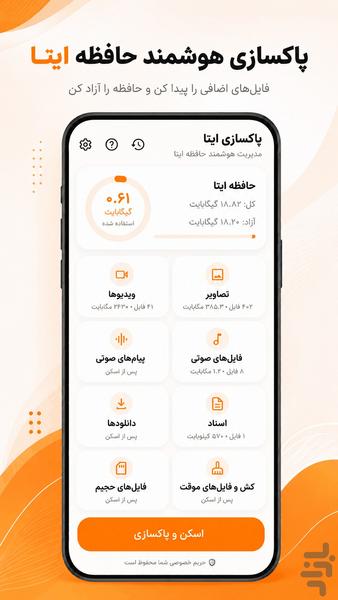
With Eitaa Cleaner, you can scan and organize Eitaa images, videos, audio files, voice messages, documents, downloads, large files and old files. Review every item before deletion and remove only the files you no longer need.
If Eitaa media and downloaded files are taking up too much storage on your phone, this app helps you browse them in clear categories and free up space more easily.
Main features:
• Scan files stored by Eitaa
• View total storage used by Eitaa files
• Browse images, videos, audio and documents separately
• Find large files
• Find old files
• Manage Eitaa downloads
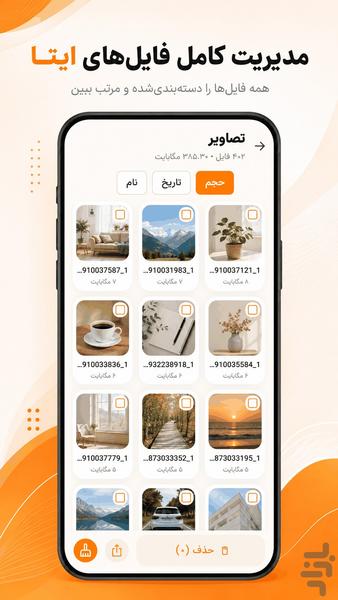
• Preview images before deletion
• View file name, size and date
• Sort files by size, date or name
• Select individual files or select multiple files
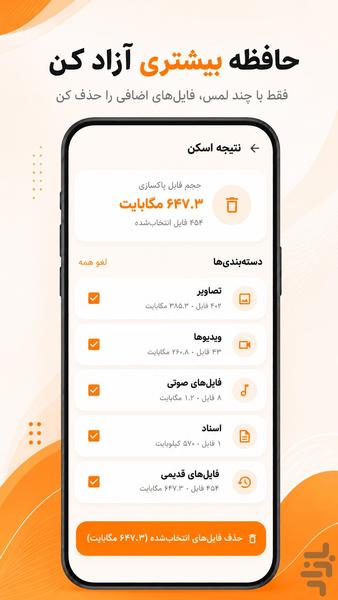
• View the selected cleanup size before deleting
• Delete files only after user confirmation
• View the amount of storage freed
• Simple Persian and right-to-left interface
• Minimal design inspired by Eitaa orange colors
• On-device file processing
• No uploading of personal media or documents
Why use Eitaa Cleaner?
Over time, Eitaa may store many images, videos, voice messages, documents and downloaded files on your device. Finding these files manually can be difficult and time-consuming. Eitaa Cleaner organizes them into separate categories so you can review and manage your phone storage more efficiently.
Privacy:
All scanning and file management operations are performed locally on your device. Your photos, videos, audio files and documents are not uploaded to any server. The app only accesses the folder selected and authorized by the user.
How to use:
1. Select the Eitaa folder when the app starts.
2. Tap “Scan and Clean”.
3. Review files in separate categories.
4. Select the files you no longer need.
5. Confirm deletion after reviewing the selected size.
Please note:
File access and deletion behavior may vary depending on the Android version and device manufacturer. Use the standard Android folder picker to grant access to the Eitaa folder.
Eitaa Cleaner is an independent application and is not officially affiliated with, endorsed by or sponsored by Eitaa.