- Applications
- Tools
RaiseHigh: Volume Booster


Images
Introduction
Make quiet media easier to hear with RaiseHigh, a straightforward volume booster and sound control app for Android.
RaiseHigh gives you one clear place to adjust media volume, choose quick sound presets, and apply extra amplification on supported devices. The large rotary control makes fine adjustments simple, while the preset buttons help you move quickly between mute, standard volume, and boosted levels.
KEY FEATURES
* Large, responsive volume knob with clear percentage feedback
* Quick presets for Mute, 30%, 60%, 100%, 125%, 150%, 175%, and Max
* System media volume control up to 100%
* Additional audio amplification above 100% on compatible devices
* Simple media controls for active audio
* Optional background operation with an ongoing status notification
* High-volume warning before boosted levels are applied
* Clean dark interface designed for fast, one-handed control
SIMPLE CONTROL
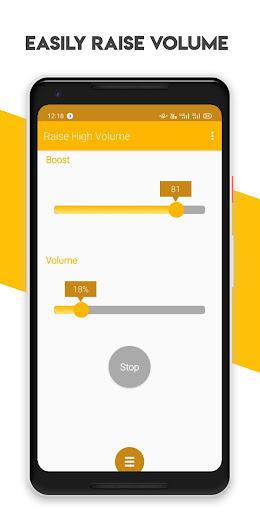
Use the knob, volume slider, preset buttons, or your phone’s physical volume keys to manage media sound. Controls stay synchronized so the displayed level remains easy to understand.
BOOST WITH CARE
Levels above 100% may introduce distortion and can place additional strain on speakers or headphones. RaiseHigh shows a warning before boosted levels are enabled. Start low, increase gradually, and reduce the level if you hear distortion or experience discomfort.
DEVICE COMPATIBILITY
Audio enhancement depends on the Android device, manufacturer, audio output, and currently playing app. Extra amplification may not be available on every phone. When enhancement is unsupported, RaiseHigh keeps standard system volume controls available and displays a clear notice.
BACKGROUND OPERATION
When the booster is switched on, RaiseHigh can keep the selected boost active while you use another app. Android displays an ongoing notification while this function is running. Switch the booster off at any time to return to the current system media volume.
MEDIA CONTROLS
The media control panel can send play, pause, previous, and next commands to compatible active players. RaiseHigh does not display or collect song titles, artists, playlists, or listening history.
PRIVACY AND ADS
RaiseHigh does not require an account. App preferences are stored locally on your device. The app uses Google AdMob for banner advertising, Google’s consent tools where required, Firebase Crashlytics for stability diagnostics, and Firebase Cloud Messaging for optional app updates and announcements. Details are available in the Privacy Policy.
RaiseHigh is an audio utility. It is not a medical device and does not diagnose, treat, cure, or prevent any medical condition.

Related Applications








Users Also Installed









Similar Applications