- Applications
- Music & Audio
Assistive Volume Button

| Install | 3.3 K |
| From 20 Rates | 3.2 |
| Category | Music & Audio |
| Size | 11 MB |
| Last Update | 2026 August 10 |

| Install | 3.3 K |
| From 20 Rates | 3.2 |
| Category | Music & Audio |
| Size | 11 MB |
| Last Update | 2026 August 10 |
Images
Introduction
Simulate the phone's physical volume and power keys on the screen.
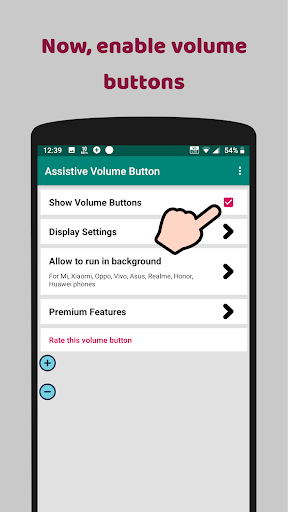
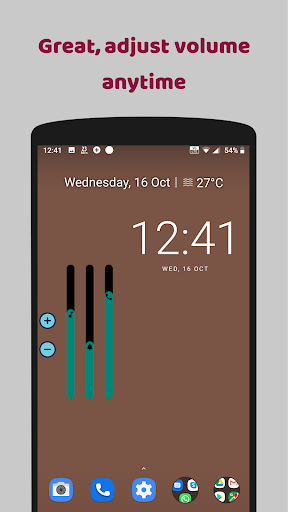
<font color="#3873E0">Assistive Volume Button</font> shows the volume and power buttons on the edge of the screen which simulates the volume control and screen on/off functionality of the phone's physical keys.
App also provide the option to show the app's own volume slider or system volume slider.
Buttons can be moved on the screen to be placed anywhere on the side edge.
Customize buttons and sliders with predefined styles like Android, iOS, MIUI, RGB & more and appearance like size, transparancy, color & more.
<font color="#3873E0">PREMIUM FEATURES</font>
Very useful premium features which can also be activated by watching an ad:
☞ Volume booster - Boost the volume of your speakers more than the phone's maximum volume.
☞ Lower brightness - Reduce the screen brightness below system minimum screen brightness.
☞ Auto screen on/off - Based on the proximity sensor input, turn screen on/off without pressing the power key.
<font color="#3873E0">SINGLE BUTTON</font>
Show only one button on the screen and tap on it will open the sliders you choose:
• Media volume
• Media booster (Speaker booster / Volume booster)
• Ring volume
• Notification volume
• Call volume
• Brightness
• Darkness (Lower brightness)
With single button, you can control wide range of Media volume from normal to boosted volume and brightness from normal brightness to lower than system minimum brightness.
<font color="#3873E0">POWER BUTTON</font> (Android 9+)
Shows power button which simulates phone's physical power key to turn screen off.
<font color="#3873E0">AUTO SCREEN ON</font>
Use proximity sensor to turn the screen on.
When you hover over the phone's proximity sensor, the screen will turn on automatically.
USECASE: When you take the phone out of your pocket, your phone screen will turn on without pressing any key.
So now it truely simulates functionaliy of the power key by turning screen off with power button from the screen and turning screen on by the proximity sensor.
<font color="#3873E0">CONFIGURATION PER APP</font>
You can set per app volume, brightness and buttons visibility.
When you open particular app, your defined configuration will be applied.
<font color="#3873E0">KEYBOARD</font>
To avoid interruption in typing, app automatically moves the buttons up when keyboard opens so that it won't interrupt with your typing.
<font color="#3873E0">WIDGET</font>
App offers following widget for home screen:
• Volume button
• Mute button
• Power button
<font color="#3873E0">ACCESSIBILITY</font>
This app uses accessibility API for the following features to work:
• Power button
• Configuration per app
• Sensitive to keyboard
<font color="#3873E0">NOTE</font>
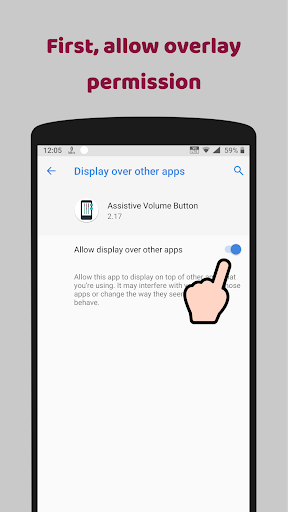
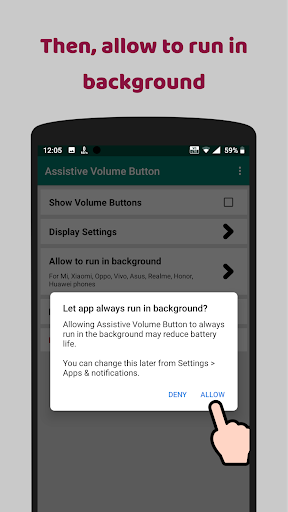
App requires permission to run the service in background.
Some phones stop the background service. Those users need to follow steps mentioned in the app.


Related Applications










Users Also Installed









Similar Applications