- Install
- 81 K
- 165
- 4.1
- Category
- Photography
- Last updated
- 2026 September 27
- Size
- 35 MB
View antivirus results
| Antivirus | Status |
|---|---|
| GooglePlayProtect | No result |
Needs further review: this scanner has not returned a result for this version of the app. | |
| McAfee | Clean |
| DrWeb | Clean |
| Comodo | Clean |
| Eset | Clean |
| Kaspersky | No result |
Needs further review: this scanner has not returned a result for this version of the app. | |
| ClamAv | Clean |
| Symantec | Clean |
| FSecure | No result |
Needs further review: this scanner has not returned a result for this version of the app. | |
| ZonerMobileSecurity | No result |
Needs further review: this scanner has not returned a result for this version of the app. | |
App screenshots
About this app
Your photos, in the era you want.
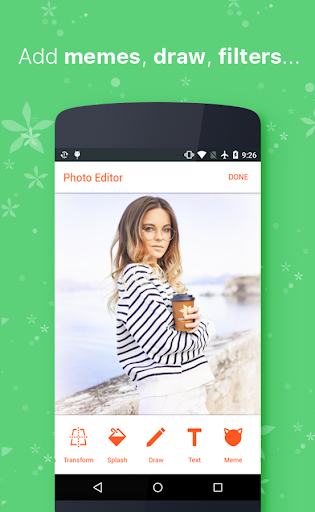
RetroSelfie is a photo editor built around film looks. Choose an aesthetic, apply it to a photo you already have or shoot one inside the app, then finish it with tools that run on your device.
Ten AI aesthetics
Each one is a complete look, not a colour wash:
- Y2K Digicam Flash: hard flash, blown highlights, early 2000s party energy
- 35mm Golden Hour: warm light, soft contrast, real film grain
- Paparazzi Night Out: flash-lit, high contrast, caught in the moment
- Quiet Luxury: clean, editorial, calm
- Euphoria Neon: saturated colour, night, electric
- Indie Sleaze: raw, lo-fi, flash in a dark room
- Dark Academia: moody, warm shadow, library light
- Hyper-Digital: sharp, cool, modern
- Summer Instant: instant-film warmth with a white border
- Movie Still: cinematic contrast and colour separation
Fourteen AI retouch edits
Enhance, Sky, Hair, Eyes, Skin, Face Shape, Background, Clean Up, Teeth Whitening, Makeup, Blemish Removal, Perfect Smile, Age and Outfit. Scene edits lead and portrait edits follow. Every one is optional, and undo covers every one of them.
Free on every photo, on your device
- 8 filters: Noir B&W, Sepia, Vintage, Golden Hour, Arctic, Drama, Vivid, Pastel
- 4 sliders: Exposure, Warmth, Contrast, Saturation
- 19 frames, including instant film, film strip, booth strip and VHS
- 8 stickers you can drag, pinch and rotate
- 7 crop ratios, plus a manual crop
- Undo and redo across everything
A camera built for the look
Shoot inside RetroSelfie with a viewfinder made for these aesthetics, so the look starts at capture instead of after.
How AI editing works
AI edits run on Google Gemini. Before your first one, a short screen explains what is sent for processing and asks your permission. The on-device tools never send anything anywhere. You can turn AI sharing off at any time in Me.
What it costs
AI edits use credits from one-time packs. There is no subscription, and credits you buy do not expire. The on-device tools cost nothing.
No account needed
Start editing without signing in. If you do create an account, you can delete it in the app, in Me.
Downloaded more than 10 million times on Google Play.
Results vary with the photo, the light and the look you choose.
Perfect for
- Photos you already have, from any camera
- A consistent look across a set of pictures
- Film and digicam aesthetics without buying film
- Edits you finish on your phone
- Portraits, travel, parties and everyday photos
Your photos, in the era you want. Start with a look.
Retro film, Y2K, digicam, CCD, vintage camera, analog, 35mm, 90s, aesthetic photo editor, film grain, instant film frames
What’s new
RetroSelfie 8.2 is a full redesign. We call it Re-shoot.
The home screen opens on ten AI aesthetics, so you choose the look before the photo. Two tool groups: Re-shoot for AI, Finish for the free tools.
Three tabs: Re-shoot, Prints, Me. The camera is rebuilt, and a consent screen explains what is sent for AI edits.
The standalone AI tab is gone; every AI edit is in the editor dock.
8 filters, 4 sliders, 19 frames, 8 stickers and 7 crops stay free.
Thanks for using RetroSelfie.