- Applications
- Tools
LG Universal Remote

| Install | 9.1 K |
| From 6 Rates | 2.5 |
| Category | Tools |
| Size | 18 MB |
| Last Update | 2026 November 3 |

| Install | 9.1 K |
| From 6 Rates | 2.5 |
| Category | Tools |
| Size | 18 MB |
| Last Update | 2026 November 3 |
Images


Introduction
LG Universal Remote Control by Illusions Inc. lets you control your TV and other compatible LG devices from your Android phone. Connect to an LG webOS TV or a supported Android TV over Wi-Fi, or use your phone’s built-in infrared (IR) blaster to control your air conditioner, soundbar, set-top box, and more.
LG Universal Remote can be used as:
>> LG Smart TV Remote
>> LG Remote Control
>> LG TV Remote Control
>> Universal Remote for LG TV
>> LG TV Remote Replacement
>> LG webOS TV Remote
>> LG Smart webOS TV Remote
>> Remote Control for LG webOS TV
>> LG webOS Touchpad Remote
>> LG Smart TV Wi-Fi Remote
>> Android TV Remote Control
>> Smart Remote for Android TV
>> LG DVD Player Remote
>> LG Blu-ray Player Remote
>> LG AC Remote Control
>> LG Set-Top Box Remote
>> LG AV Receiver Remote
>> LG Projector Remote
>> LG Home Theatre Remote
>> LG Soundbar Remote
Connect to your LG webOS TV
Connect your phone and TV to the same Wi-Fi network. Tap Connect my TV, select your LG TV, and enter the pairing PIN shown on the TV if prompted. Once paired, you can reconnect to your saved TV.
- Remote — Adjust the volume, mute the sound, switch inputs, and control playback. Use the D-pad to browse menus or switch to the touchpad to move the TV cursor and tap to select.
- Apps — Browse the apps installed on your TV in a grid and launch one from your phone.
- Voice — Tap the mic and say “Volume up” or “Go home.” Recognized commands run automatically. To dictate a search, first select a supported text field on the TV. You can also type on your phone.
- Cast — Show a photo or play a supported video from your phone on the TV. Stop casting from the app or the sharing notification. You can also mirror your screen when your phone and TV support wireless display.
Connect to an Android TV
Select a compatible Android TV on the same Wi-Fi network and follow the pairing instructions. Use the on-screen directional controls to move through menus and select what you want to watch. Wi-Fi remote control works on phones without an IR blaster.
Set up and save an IR remote
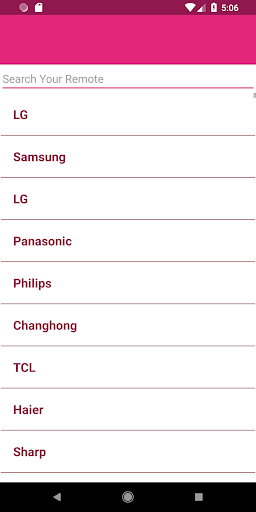
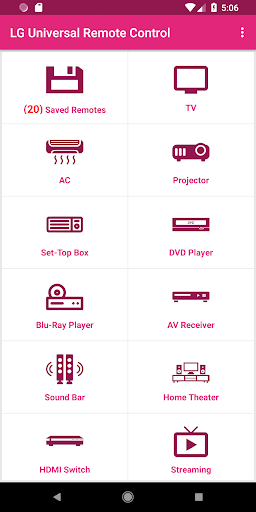
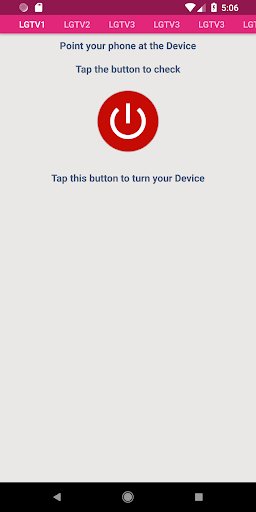
Tap Explore IR remotes, choose your device type, and point your phone at the device. Test a button. If the device responds, tap Yes to save and open that remote. If it doesn’t, tap No to try the next profile.
Keep multiple profiles in Saved Remotes so you can switch between devices without repeating setup. Use the AC remote to adjust temperature, fan speed, and swing, the set-top box remote to change channels, or the soundbar remote to adjust volume and inputs. Available buttons depend on your device model and the selected profile.
IR control requires a phone with a built-in IR blaster. Microphone access is optional and requested when you tap the mic.
Support
For help finding a working remote, email daud19887@gmail.com with your phone model, device type, and device model number.
LG Universal Remote Control is an independent app developed by Illusions Inc. It is not affiliated with or endorsed by LG Electronics or Google.

Related Applications





Users Also Installed






Similar Applications