
- Applications
- Tools
همسپار

| Install | <10 |
| From 0 Rates | 0 |
| Category | Tools |
| Size | 47 MB |
| Last Update | 2026 May 31 |

| Install | <10 |
| From 0 Rates | 0 |
| Category | Tools |
| Size | 47 MB |
| Last Update | 2026 May 31 |
Images
Introduction
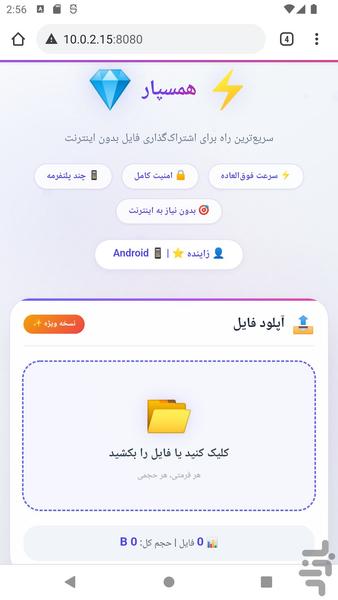
📁 Hamsepar | Fastest Way to Share Files Without Internet
Welcome to Hamsepar! No more need for internet, mobile data, or apps like SHAREit to transfer files.
✨ Why Hamsepar?
- No internet required: Just turn on your phone's hotspot
- No need to install Hamsepar on the other device
- Ultra-fast: Transfer at local WiFi speed
- Completely free: Files up to 500MB with zero cost
- No limits on number of files or connected devices
- Supports all formats: Videos, photos, music, documents, apps and more
🎯 What can you do with Hamsepar?
✅ Transfer files between phone and computer without cable
✅ Share movies and series with friends
✅ Receive files from other devices without using mobile data
✅ Upload and download multiple files simultaneously
✅ Manage files on server (download and delete)
🔐 Security in Hamsepar
Hamsepar works on your local network and never sends any data to external servers. All connections between devices are direct and secure.
💎 Premium Version
- Upload files larger than 500MB
- Support the developer
📱 How to use:
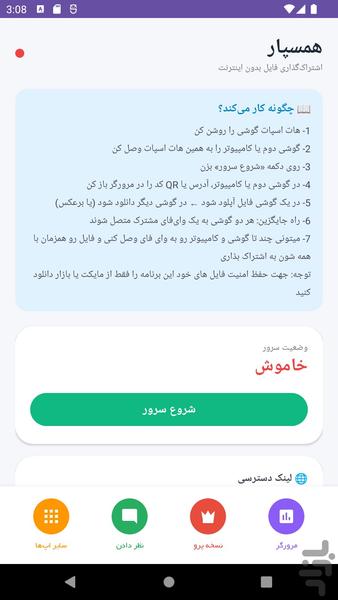
1. Turn on your phone's hotspot
2. Connect the other device to your hotspot
3. Tap "Start Server" in Hamsepar
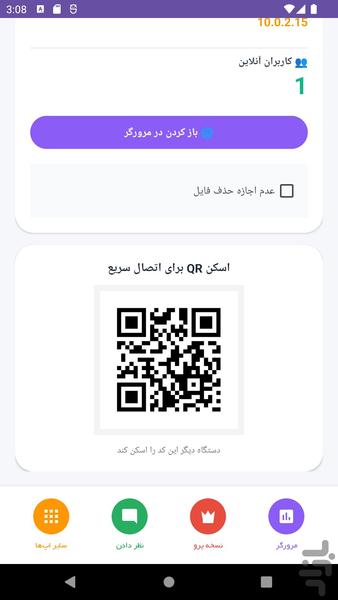
4. Open the URL or scan the QR code on the other device's browser
5. Upload the file on one device and download on the other
💡 Pro Tips:
- Both devices must be connected to the same WiFi network
- You can connect multiple devices at the same time
- To transfer files to a computer, just enter the address in your browser
📊 Features:
- View online users connected to the server
- Display file size and total file count
- Password-protected file deletion
- QR code generation for quick connection
Hamsepar | Share files without internet, anytime, anywhere